Showing posts with label Loops. Show all posts

Monday, May 1, 2017

Calculate the factorial in C++ || C++ Sample Programs

Leave a Comment
Question::

Write a program that asks the user to enter an integer number. The main() program will pass this number to a function called “ fact()”. This function will return the factorial of the input value. Show the calculated factorial of the given number on the screen.

Code:

/**************************************************|
/*************C++ Programs And Projects************|
***************************************************/
#include<iostream>
using namespace std;

int fact(int); // prototype of a function

void main() {
       int number;
       cout << "Enter a Number to find its factorial == ";
       cin >> number;
       cout<<"Factorial of "<<number<<"is == "<<fact(number);
}


//Body of a function

//Logic of factorial is pretty simple that is if we have a number like 5 then the formula of factorial
//will be like this 5*4*3*2*1
int fact(int myFactorial) {
       int result = 1;
       for (int i = 1; i <=myFactorial; i++)
       {
              if (result == 1) {
                     result = result*i;
              }
              else
              {
                     result = result*i;
              }
       }
       return result;
}


Related Articles:

C++ Primer Plus Sixth Edition Complete Solution Manual 

C++ Books Solution


Read More

Friday, January 6, 2017

Create the equivalent of a four-function calculator. The program should ask the user to enter a number, an operator, and another number. (Use floating point.) It should then carry out the specified arithmetical operation: adding, subtracting, multiplying, or dividing the two numbers. Use a switch statement to select the operation. Finally, display the result. When it finishes the calculation, the program should ask whether the user wants to do another calculation. The response can be ‘y’ or ‘n’. Some sample interaction with the program might look like this: Enter first number, operator, second number: 10 / 3 Answer = 3.333333 Do another (y/n)? y Enter first number, operator, second number: 12 + 100 Answer = 112 Do another (y/n)? n

Leave a Comment
Object-Oriented Programming in C++ Fourth Edition By Robert Lafore Chapter-3 C++ Loops and Decisions  -- Questions+Exercises

Question:

Create the equivalent of a four-function calculator. The program should ask the user to enter a number, an operator, and another number. (Use floating point.) It should then carry out the specified arithmetical operation: adding, subtracting, multiplying, or dividing the two numbers. Use a switch statement to select the operation. Finally, display the result. When it finishes the calculation, the program should ask whether the user wants to do another calculation. The response can be ‘y’ or ‘n’. Some sample interaction with the program might look like this:

Enter first number, operator, second number: 10 / 3
Answer = 3.333333
Do another (y/n)? y

Enter first number, operator, second number: 12 + 100
Answer = 112
Do another (y/n)? n

Explanation:
Below mention code is compiled in Visual Studio 2015 and Code Blocks 13.12,output snap is attached.. If any problem you feel and you want some explanation feel free to contact us.

Code:

/**************************************************|
/*************C++ Programs And Projects************|
***************************************************/
#include <iostream>
using namespace std;
int main()
{
       double n1, n2, ans;
       char oper, ch;
       do {
              cout << "\nEnter first number, operator, second number : ";
              cin >> n1 >> oper >> n2;
              switch (oper)
              {
              case '+':  ans = n1 + n2;  break;
              case '-':  ans = n1 - n2;  break;
              case '*':  ans = n1 * n2;  break;
              case '/':  ans = n1 / n2;  break;
              default:   ans = 0;
              }
              cout << "Answer = " << ans;
              cout << "\nDo another(Enter ‘y’ or ‘n’) ? ";
              cin >> ch;
       } while (ch != 'n');
       return 0;

}

Output:
Create the equivalent of a four-function calculator. The program should ask the user to enter a number, an operator, and another number. (Use floating point.) It should then carry out the specified arithmetical operation: adding, subtracting, multiplying, or dividing the two numbers. Use a switch statement to select the operation. Finally, display the result. When it finishes the calculation, the program should ask whether the user wants to do another calculation. The response can be ‘y’ or ‘n’. Some sample interaction with the program might look like this:  Enter first number, operator, second number: 10 / 3 Answer = 3.333333 Do another (y/n)? y  Enter first number, operator, second number: 12 + 100 Answer = 112 Do another (y/n)? n


Related Articles:


Read More

Tuesday, April 26, 2016

Euler numbers in c++ -- How to

Leave a Comment
Explanation:
Below mention code is compiled in Visual Studio 2015 and Code Blocks 13.12,output snap is attached.. If any problem you feel and you want some explanation feel free to contact us.


e (Euler's Number)

The number e is a famous irrational number, and is one of the most important numbers in mathematics.
The first few digits are:

2.7182818284590452353602874713527 (and more ...)
It is often called Euler's number after Leonhard Euler.
And Euler is spoken like "Oiler".
e is the base of the Natural Logarithms (invented by John Napier).
e is found in many interesting areas, so it is worth learning about.

Calculating

There are many ways of calculating the value of e, but none of them ever give an exact answer, because e is irrational (not the ratio of two integers).
But it is known to over 1 trillion digits of accuracy!
For example, the value of (1 + 1/n)n approaches e as n gets bigger and bigger:
graph of (1+1/n)^n
n(1 + 1/n)n
12.00000
22.25000
52.48832
102.59374
1002.70481
1,0002.71692
10,0002.71815
100,0002.71827

Code:

/**************************************************|
/*************C++ Programs And Projects************|
***************************************************/
#include<iostream>
#include<math.h>
using namespace std;
void main() {
       int Number = 0;
       cout << "Enter Ending Point for Euler Numbers = ";
       cin >> Number;
       for (float i = 1; i <= Number; i++) {
              //(1 + 1 / n)n
              float tempResult = ((1 / i) + 1);
              float result = pow(tempResult, i);
              cout << i << " == " << result << endl;
       }

}

Output:


Read More

Wednesday, February 3, 2016

Write C++ Program to draw up side down right angle triangle using alphabets

Leave a Comment
Questions:

Write C++ Program to draw up side down right angle triangle using alphabets

Explanation:

This C++ Program is examples of nested loop.Below mention code is compiled in Visual Studio 2015 and output snap is attached.. If any problem you feel and want explanation feel free to contact.

Code:

/**************************************************|
/*************C++ Programs And Projects************|
***************************************************/
#include<iostream>
using namespace std;
void main() {
       int value = 0;
       cout << "Enter Value for the size of Triangle = ";
       cin >> value;
       int temp = value;
       for (int i = 0; i < value; i++) {
              for (int space = 0; space < i; space++) {
                     cout << " ";
              }
              for (int counting = 0; counting < temp; counting++) {
                     cout <<char(temp+64);
              }
              temp--;
              cout << endl;
       }


}

Output:


Related Articles:

C++ Shapes Codes
Read More

Sunday, January 31, 2016

Write a C program that calculates product of two numbers using repeated addition i.e. without using the * operator.

Leave a Comment
Solution:- 

     #include <iostream>
#include <conio>

int main() 
{
   int x, y;
   cin >> x >> y;  // Let x=A, y=B
   int p = 0;// Invariant: A*B = p + x*y

 while (y > 0) 
{
   p = p + x; 
   y = y – 1;
}

cout << p << endl;
}
getche();

Read More

Friday, August 7, 2015

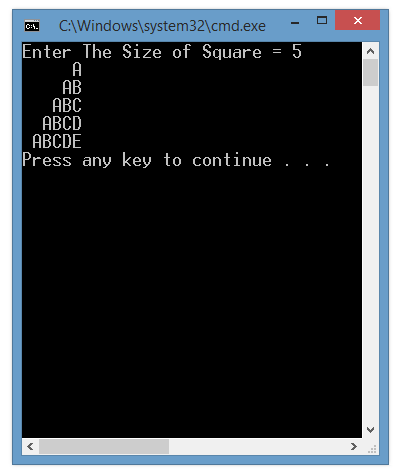
Left Triangle pattern using Capital Alphabet single in on line

Leave a Comment
Questions:

Left Triangle pattern using Capital Alphabet single in on line

Code:

#include<iostream>
using namespace std;
void main()
{

//Left Triangle pattern using Capital Alphabet single in on line
int square,space=0;
cout<<"Enter The Size of Square = "; // size
cin>>square;
space=square;
for(int i=1;i<=square;i++)
{
for(int j=1;j<=space;j++)
{
cout<<" ";
}
for(int l=1;l<=i;l++)
{
cout<<char(l+64);
}
cout<<endl;
space--;
}

}


Output


Read More

Left Triangle pattern using Capital Alphabet single in on line

Leave a Comment
Questions:

Left Triangle pattern using Capital Alphabet single in on line

Code:

#include<iostream>
using namespace std;
void main()
{

//Left Triangle pattern using Capital Alphabet single in on line
int square,space=0;
cout<<"Enter The Size of Square = "; // size
cin>>square;
space=square;
for(int i=1;i<=square;i++)
{
for(int j=1;j<=space;j++)
{
cout<<" ";
}
for(int l=1;l<=i;l++)
{
cout<<char(i+64);
}
cout<<endl;
space--;
}

}


Output


Read More

Left Triangle pattern using Numerical digits

Leave a Comment
Questions:

Left Triangle pattern using Numerical digits

Code:

#include<iostream>
using namespace std;
void main()
{

//Left Triangle pattern using Numerical digits
int square,space=0;
cout<<"Enter The Size of Square = "; // size
cin>>square;
space=square;
for(int i=1;i<=square;i++)
{
for(int j=1;j<=space;j++)
{
cout<<" ";
}
for(int l=1;l<=i;l++)
{
cout<<l;
}
cout<<endl;
space--;
}

}


Output


Read More

Left Triangle pattern using Numerical digits

Leave a Comment
Questions:

Left Triangle pattern using Numerical digits

Code:

#include<iostream>
using namespace std;
void main()
{

//Left Triangle pattern using Numerical digits
int square,space=0;
cout<<"Enter The Size of Square = "; // size
cin>>square;
space=square;
for(int i=1;i<=square;i++)
{
for(int j=1;j<=space;j++)
{
cout<<" ";
}
for(int l=1;l<=i;l++)
{
cout<<i;
}
cout<<endl;
space--;
}

}


Output


Read More

Left Triangle pattern using stars

Leave a Comment
Questions:

Left Triangle pattern using stars

Code:

#include<iostream>
using namespace std;
void main()
{

//Left Triangle pattern using stars
int square,space=0;
cout<<"Enter The Size of Square = "; // size
cin>>square;
space=square;
for(int i=1;i<=square;i++)
{
for(int j=1;j<=space;j++)
{
cout<<" ";
}
for(int l=1;l<=i;l++)
{
cout<<"*";
}
cout<<endl;
space--;
}

}


Output

Read More

Right Triangle pattern using capital alphabets E D C B A

Leave a Comment
Questions:

Right Triangle pattern using capital alphabets E D C B A

Code:

#include<iostream>
using namespace std;
void main()
{
//Right Triangle pattern using capital alphabets E D C B A
int square;
cout<<"Enter The Size of Square = "; // size
cin>>square;
for(int i = 1;i<=square;i++) // outer loop
{
for(int j=square;j>=i;j--) //inner loop
{
cout<<char(j+64)<<" "; // value that is output
}
cout<<endl;//new line for next line output
}

}


Output

Read More

Right Triangle pattern using capital Alphabets

Leave a Comment
Questions:

Right Triangle pattern using capital Alphabets

Code:

#include<iostream>
using namespace std;
void main()
{
//Right Triangle pattern using capital Alphabets
int square;
cout<<"Enter The Size of Square = "; // size
cin>>square;
for(int i = square;i>=1;i--) // outer loop
{
for(int j=1;j<=i;j++) //inner loop
{
cout<<char(i+64)<<" "; // value that is output
}
cout<<endl;//new line for next line output
}

}


Output


Read More

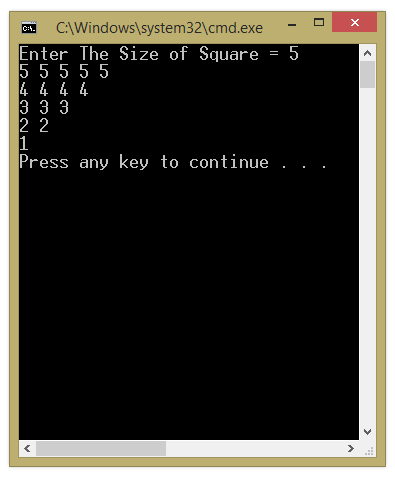
Right Triangle pattern using numerical digits

Leave a Comment
Questions:

Right Triangle pattern using numerical digits
Code:

#include<iostream>
using namespace std;
void main()
{
//Right Triangle pattern using numerical digits
//5 4 3 2 1
//5 4 3 2
//5 4 3
//5 4
//5

int square;
cout<<"Enter The Size of Square = "; // size
cin>>square;
for(int i = 1;i<=square;i++) // outer loop
{
for(int j=square;j>=i;j--) //inner loop
{
cout<<j<<" "; // value that is output
}
cout<<endl;//new line for next line output
}

}


Output


Read More

Right Triangle pattern using numerical digits

Leave a Comment
Questions:

Right Triangle pattern using numerical digits
Code:

#include<iostream>
using namespace std;
void main()
{
//Right Triangle pattern using numerical digits
int square;
cout<<"Enter The Size of Square = "; // size
cin>>square;
for(int i = square;i>=1;i--) // outer loop
{
for(int j=1;j<=i;j++) //inner loop
{
cout<<i<<" "; // value that is output
}
cout<<endl;//new line for next line output
}

}


Output

Read More

Thursday, March 19, 2015

Right Triangle pattern using Capital in reverse triangle order

Leave a Comment
Code:

#include<iostream>
using namespace std;
void main()
{
//Right Triangle pattern using Capital in reverse triangle order
int square;
cout<<"Enter The Size of Square = "; // size
cin>>square;
for(int i = square;i>=1;i--) // outer loop
{
for(int j=1;j<=i;j++) //inner loop
{
cout<<char(i+64)<<" "; // value that is output
}
cout<<endl;//new line for next line output
}

}


Output


Read More

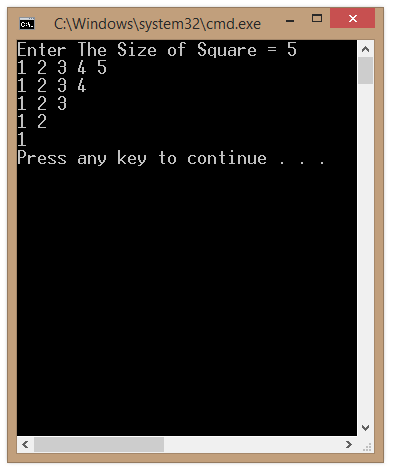
Right Triangle pattern using Numeric in reverse order

Leave a Comment
Code:

#include<iostream>
using namespace std;
void main()
{
//Right Triangle pattern using Numeric in reverse order
int square;
cout<<"Enter The Size of Square = "; // size
cin>>square;
for(int i = square;i>=1;i--) // outer loop
{
for(int j=1;j<=i;j++) //inner loop
{
cout<<j<<" "; // value that is output
}
cout<<endl;//new line for next line output
}

}


Output


Read More

Right Triangle pattern using Numeric single digit in one line in reverse order

Leave a Comment
Code:

#include<iostream>
using namespace std;
void main()
{
//Right Triangle pattern using Numeric single digit in one line in reverse order
int square;
cout<<"Enter The Size of Square = "; // size
cin>>square;
for(int i = square;i>=1;i--) // outer loop
{
for(int j=1;j<=i;j++) //inner loop
{
cout<<i<<" "; // value that is output
}
cout<<endl;//new line for next line output
}

}


Output


Read More

Right Triangle pattern using asterisk in reverse order

Leave a Comment
Code:

#include<iostream>
using namespace std;
void main()
{
//Right Triangle pattern using asterisk in reverse order
int square;
cout<<"Enter The Size of Square = "; // size
cin>>square;
for(int i = square;i>=1;i--) // outer loop
{
for(int j=1;j<=i;j++) //inner loop
{
cout<<"* "; // value that is output
}
cout<<endl;//new line for next line output
}

}


Output


Read More

Right Triangle pattern using Capital Alphabets

Leave a Comment
Code:

#include<iostream>
using namespace std;
void main()
{
//Right Triangle pattern using Capital Alphabets
int square;
cout<<"Enter The Size of Square = "; // size
cin>>square;
for(int i = 1;i<=square;i++) // outer loop
{
for(int j=1;j<=i;j++) //inner loop
{
cout<<char(j+64); // value that is output
}
cout<<endl;//new line for next line output
}

}


Output

Read More

Right Triangle pattern using Capital Alphabet single in one line

Leave a Comment
Code:

#include<iostream>
using namespace std;
void main()
{
//Right Triangle pattern using Capital Alphabet single in one line
int square;
cout<<"Enter The Size of Square = "; // size
cin>>square;
for(int i = 1;i<=square;i++) // outer loop
{
for(int j=1;j<=i;j++) //inner loop
{
cout<<char(i+64); // value that is output
}
cout<<endl;//new line for next line output
}

}


Output

Read More